Why it mattered
Scattered workflows, raw time data.
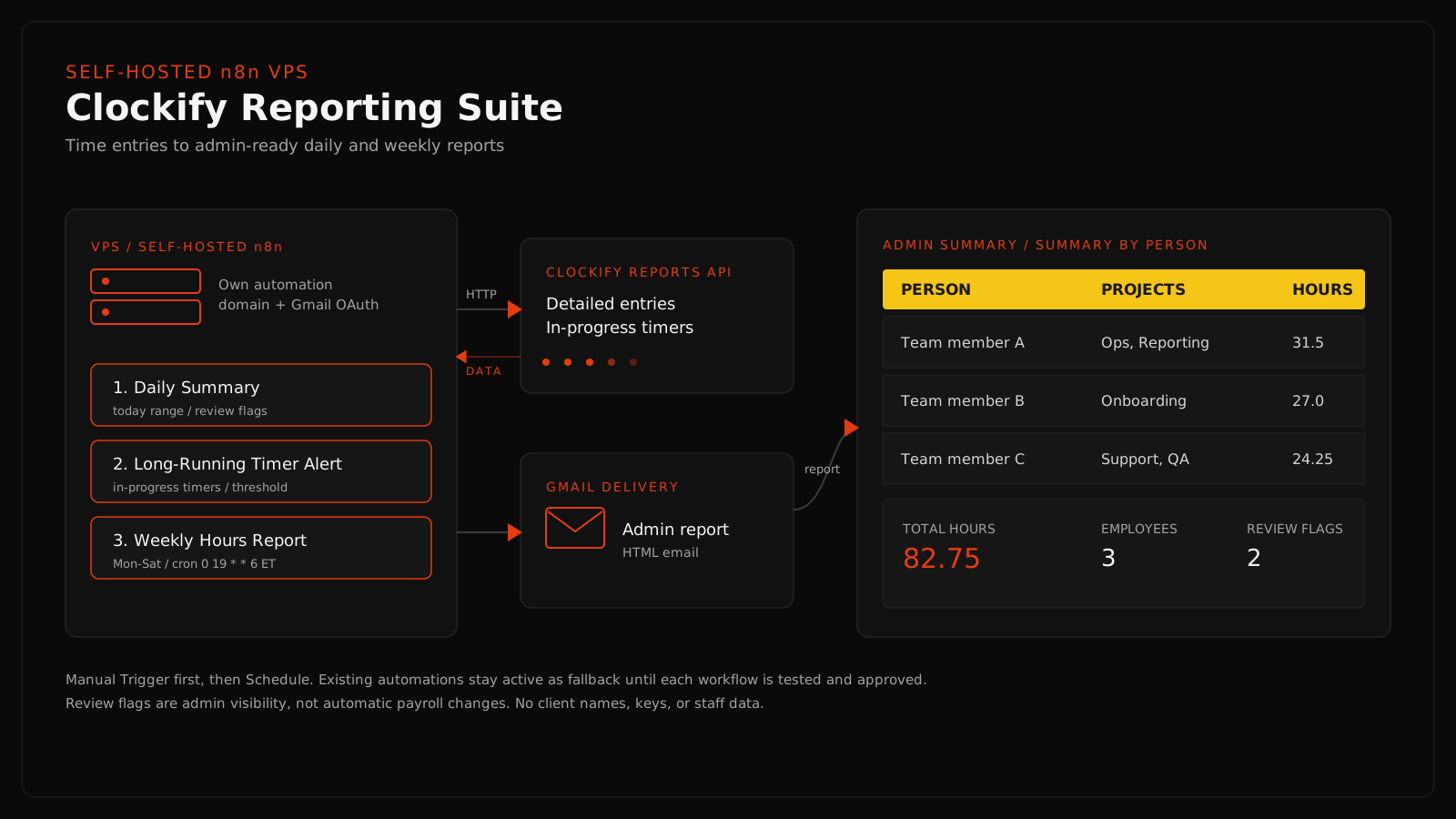
The client had operations automations spread across Zapier-style workflows and needed a more controllable, inspectable, and extensible setup. Clockify time data needed to become readable admin reports instead of messy raw API entries or manual dashboard checking. The system needed to keep admin review safe, avoid accidental staff emails, and preserve existing fallback paths until the n8n workflows were tested.
Infrastructure
A self-hosted setup built to be maintained.
The automation layer runs on a self-hosted n8n instance with its own domain, so the client controls the infrastructure and the system can be extended over time.
Self-hosted n8n instance on a VPS
n8n exposed on its own automation domain
Gmail OAuth callback configured for the n8n domain
Manual Trigger first, then Schedule Trigger after validation
API credentials stored in n8n credential and header fields, not in code
Workflow logic documented so the system can be maintained and extended
Workflow breakdown
Three reporting lanes and one safe migration pattern.
Workflow 1
Clockify Daily Summary
Admin-facing daily operations visibility.
Trigger -> Set Config -> Build Today Date Range -> Build Request Body -> HTTP Request to Clockify Reports Detailed API -> Summarize Daily Entries and Flags -> Gmail admin summary
- Pulls detailed Clockify time entries for the current day.
- Parses multiple possible Clockify response shapes defensively.
- Groups time by person and project.
- Calculates total hours, employee count, project count, entry count, and review flag count.
- Flags entries that may need cleanup, such as missing project, task, or description.
- Generates readable HTML email output for admin review.
- Keeps review flags as admin visibility, not automatic payroll changes.
Turns messy time entries into a readable daily operations report and helps the admin catch incomplete time tracking earlier.
Workflow 2
Long-Running Timer Alert
Catch active timers that may have been left running too long.
Trigger -> Set Config -> HTTP Request to Clockify in-progress entries -> Analyze Active Timers -> Filter timers over threshold -> Gmail alert to admin
- Checks currently running Clockify timers.
- Calculates how long each active timer has been running.
- Flags timers that pass a configured threshold.
- Produces a concise admin alert instead of changing staff records.
- Keeps the alert review-first, so the admin decides what to do.
Prevents long-running timer issues from silently skewing time reports, adding visibility without risky automatic corrections.
Workflow 3
Clockify Weekly Hours Report
Clean weekly hours reporting for admin visibility.
Trigger -> Set Config -> Build Monday to Saturday Date Range -> Build Request Body -> HTTP Request to Clockify Reports Detailed API -> Summarize Weekly Hours -> Gmail weekly report
- Pulls Clockify detailed time entries for the weekly reporting range.
- Calculates total hours, employees, projects, and entry count.
- Builds a Summary by Person table with each person's projects worked on.
- Builds a Summary by Project table.
- Uses yellow table headers for better email visibility.
- Removes review flags so the weekly email stays clean and non-redundant.
- Keeps weekly reporting separate from payroll finalization.
Produces a clean admin-ready weekly hours report. Final schedule: Saturday 7:00 PM ET, covering Monday 12:00 AM ET through Saturday 7:00 PM ET (cron 0 19 * * 6, America/New_York).
Workflow 4
Safe Zapier-to-n8n Replacement Pattern
Use n8n as the new control layer without breaking operations.
Build n8n in parallel -> Manual test -> Test recipient email -> Scheduled test -> Admin approval -> Only then retire the matching legacy path
- Avoids turning off working automations too early.
- Creates a repeatable validation process for each workflow.
- Keeps risky production changes approval-gated.
- Documents which automations are complete, pending, or still fallback-backed.
Shows that real client systems need safe migration paths, not just new tools, with production judgment and change-management discipline.
Proof
The actual n8n workflows.
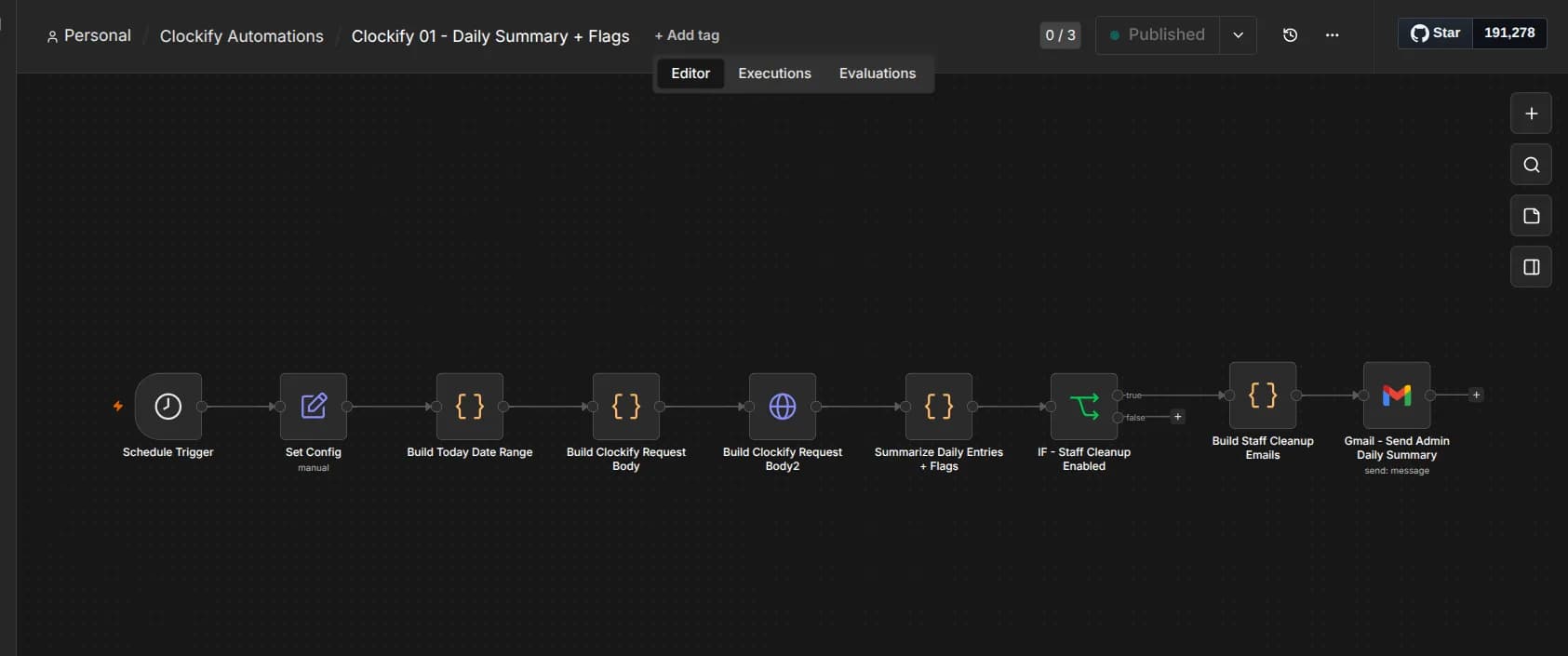
Clockify 01 - Daily Summary + Flags
Schedule Trigger -> Set Config -> Build Today Date Range -> Build Clockify Request Body -> Summarize Daily Entries + Flags -> IF Staff Cleanup Enabled -> Gmail Send Admin Daily Summary
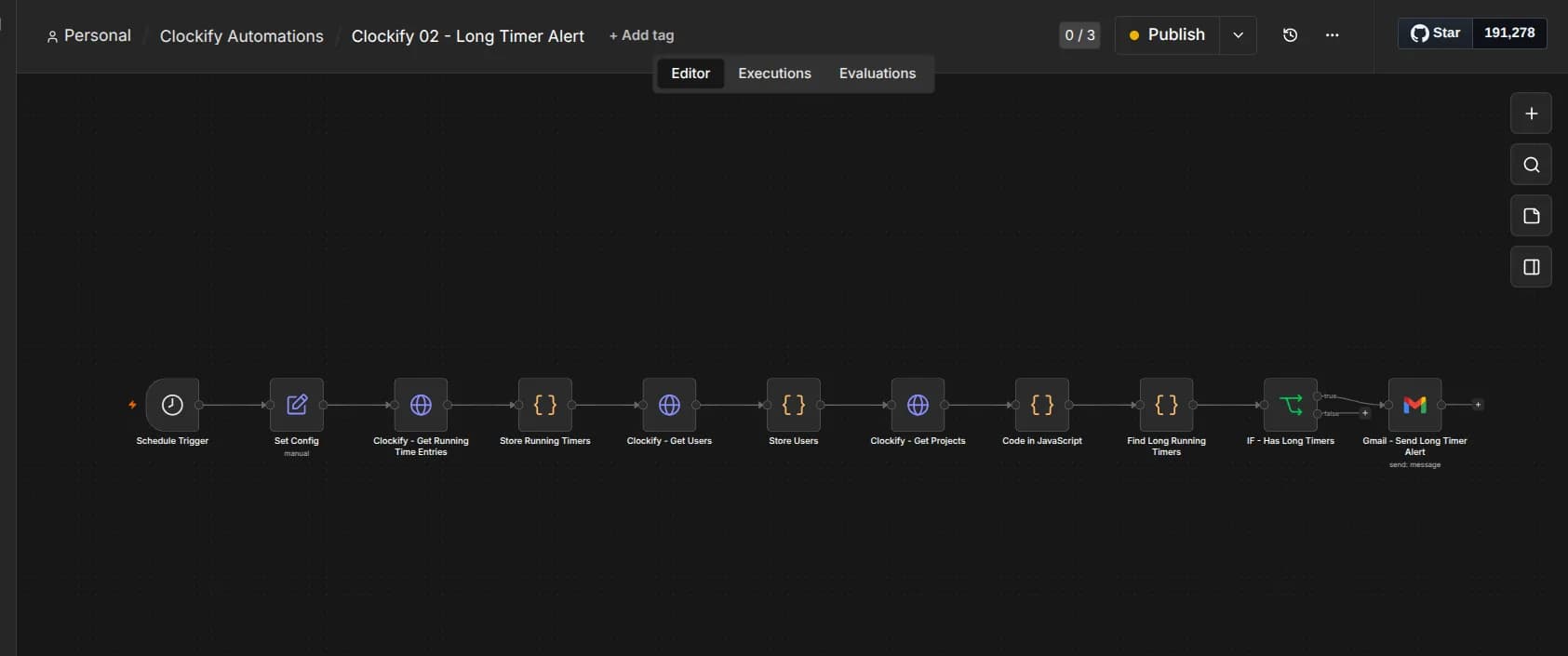
Clockify 02 - Long Timer Alert
Schedule Trigger -> Clockify Get Running Time Entries -> Get Users -> Get Projects -> Code in JavaScript -> Find Long Running Timers -> IF Has Long Timers -> Gmail Send Long Timer Alert
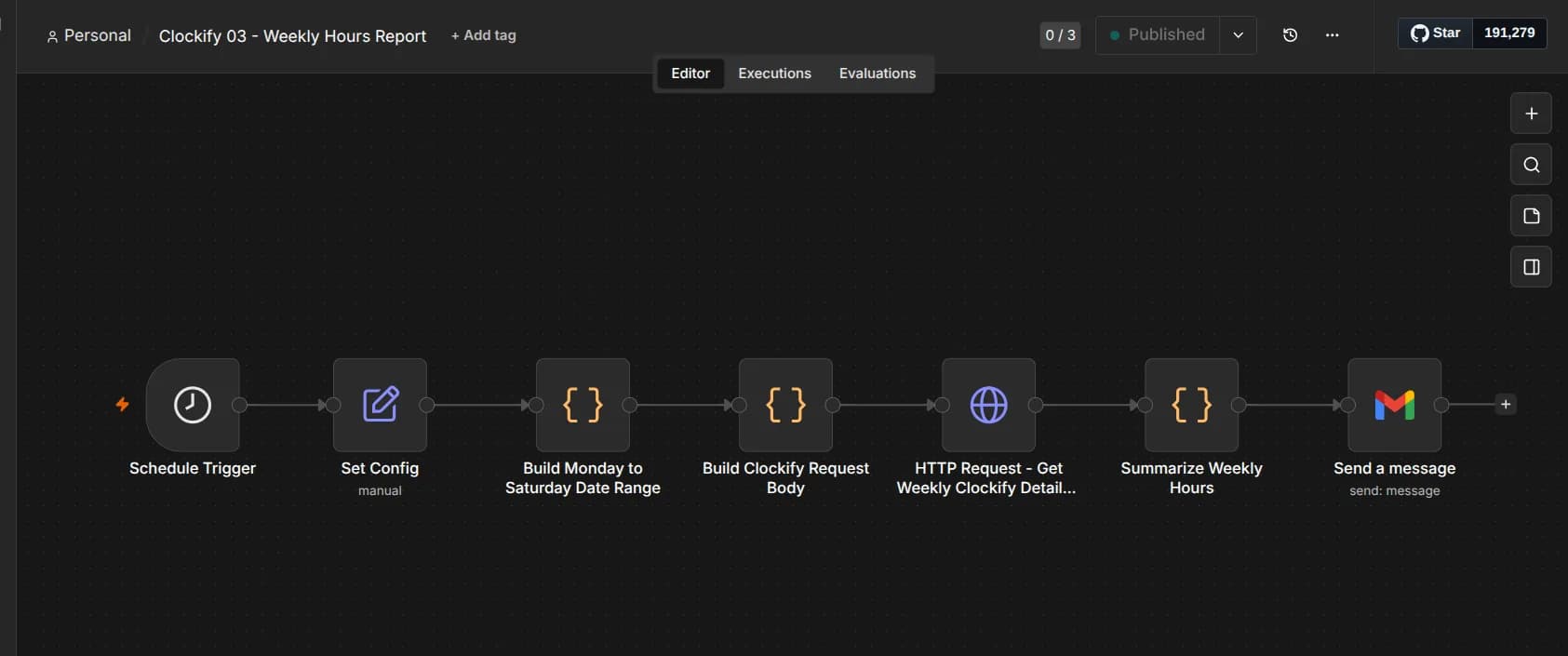
Clockify 03 - Weekly Hours Report
Schedule Trigger -> Set Config -> Build Monday to Saturday Date Range -> Build Clockify Request Body -> HTTP Request Weekly Clockify Detailed -> Summarize Weekly Hours -> Gmail report
What I built
The operating layer behind the reports.
Self-hosted n8n setup on a VPS with its own automation domain
Clockify Daily Summary reporting workflow
Long-Running Timer Alert workflow
Clockify Weekly Hours Report workflow
Defensive parsing for multiple Clockify response shapes
Schedule triggers with manual-first validation
Documented Zapier-to-n8n replacement pattern
Safety and operations judgment
Keeping a live system safe during migration.
The work focused on production judgment. New reporting ran in parallel with existing automations, every workflow was validated before scheduling, and reporting stayed clearly separate from payroll review. The result is more operations visibility without turning reporting into unreviewed payroll automation.
Existing automations stay active as fallback until each n8n workflow is approved.
Reports are tested manually before any schedule is turned on.
Payroll review stays separate from automated reporting.
Production cutover is approval-gated, one workflow at a time.
Review flags stay as admin visibility, never automatic staff record changes.
Test recipients are used so staff are never emailed during validation.
Outcome
A clearer operations visibility layer.
- Built a self-hosted automation layer for client operations workflows.
- Improved visibility into staff time entries and project allocation.
- Reduced manual checking of Clockify entries.
- Created admin-ready summary emails from Clockify API data.
- Separated daily review flags from weekly hours reporting.
- Built a safer path from Zapier-style workflows to n8n without a risky cutover.
- Created reusable n8n patterns for future operations reporting workflows.
Self-hosted VPS
n8n workflows
Clockify data
Gmail reports
Daily flags
Weekly report
Safe migration
Documentation
Skills demonstrated
Operator-led automation work.
In short
I recently built a self-hosted n8n reporting suite that turns Clockify time data into daily and weekly admin emails, with manual-first testing, safe fallback paths, and clear separation between reporting and payroll review.